
How to Get Official Meta WhatsApp Business API for Free (Step-by-Step Embedded Signup Guide)
Complete step-by-step tutorial on how to get official WhatsApp Business API for free using Meta approved embedded signup, mobile app coexistence, and zero message markups.
Connecting to the official WhatsApp Business API used to require complex developer verification, weeks of waiting, and expensive setup retainers charged by third-party brokers (Business Solution Providers). Today, Meta has revolutionized this onboarding with the official WhatsApp Business API embedded signup.
With WaCloudBot—an official Meta Tech Partner—any business can activate direct access to the Meta WhatsApp Cloud API in under 2 minutes with zero setup fees and no technical coding.
Unlike unauthorized WhatsApp web scrapers and browser automation extensions that trigger instant phone number bans and compromise your brand credibility, the official Cloud API provides guaranteed delivery, 99.9% uptime, verified business profiles, and complete compliance with Meta's Business Policies.
Watch the Complete Video Tutorial
Follow along with this step-by-step walkthrough demonstrating how to connect your number to Meta's Cloud API in real-time:
Prerequisites Checklist
Before launching the embedded signup flow, ensure you have the following ready:
- Active Personal Facebook Account: An authentic Facebook profile with Full Control (Admin rights) on your Meta Business Portfolio (formerly Meta Business Manager).
- A Phone Number: You can use either:
- An existing phone number already registered on the WhatsApp Business mobile app (supported via WhatsApp Business App Coexistence), or
- A clean, unlinked mobile number or landline capable of receiving a 6-digit OTP via SMS or voice call.
- WaCloudBot Account: An active account with a 30-day free trial (no credit card or upfront billing required).
Security & Anti-Ban Warning
Never use unofficial Chrome extensions or headless browser automation tools (such as web scrapers or unofficial QR-gateway wrappers) for customer communications. Meta actively detects automated browser sessions, resulting in permanent and irreversible phone number bans. The Meta Cloud API is an anti-ban WhatsApp API that protects your business identity with end-to-end official encryption.
Step-by-Step Embedded Signup Guide
Step 1: Create Your Free WaCloudBot Workspace
Start by creating your workspace on WaCloudBot. Sign up for the 30-day free trial with instant access—no credit card is required.
Once logged in, you will be greeted by the central WaCloudBot management console.
Pro-Tip: Zero Financial Commitment
Your 30-day free trial includes access to all core platform features, including the multi-agent shared inbox, campaign scheduler, and no-code visual bot builder.
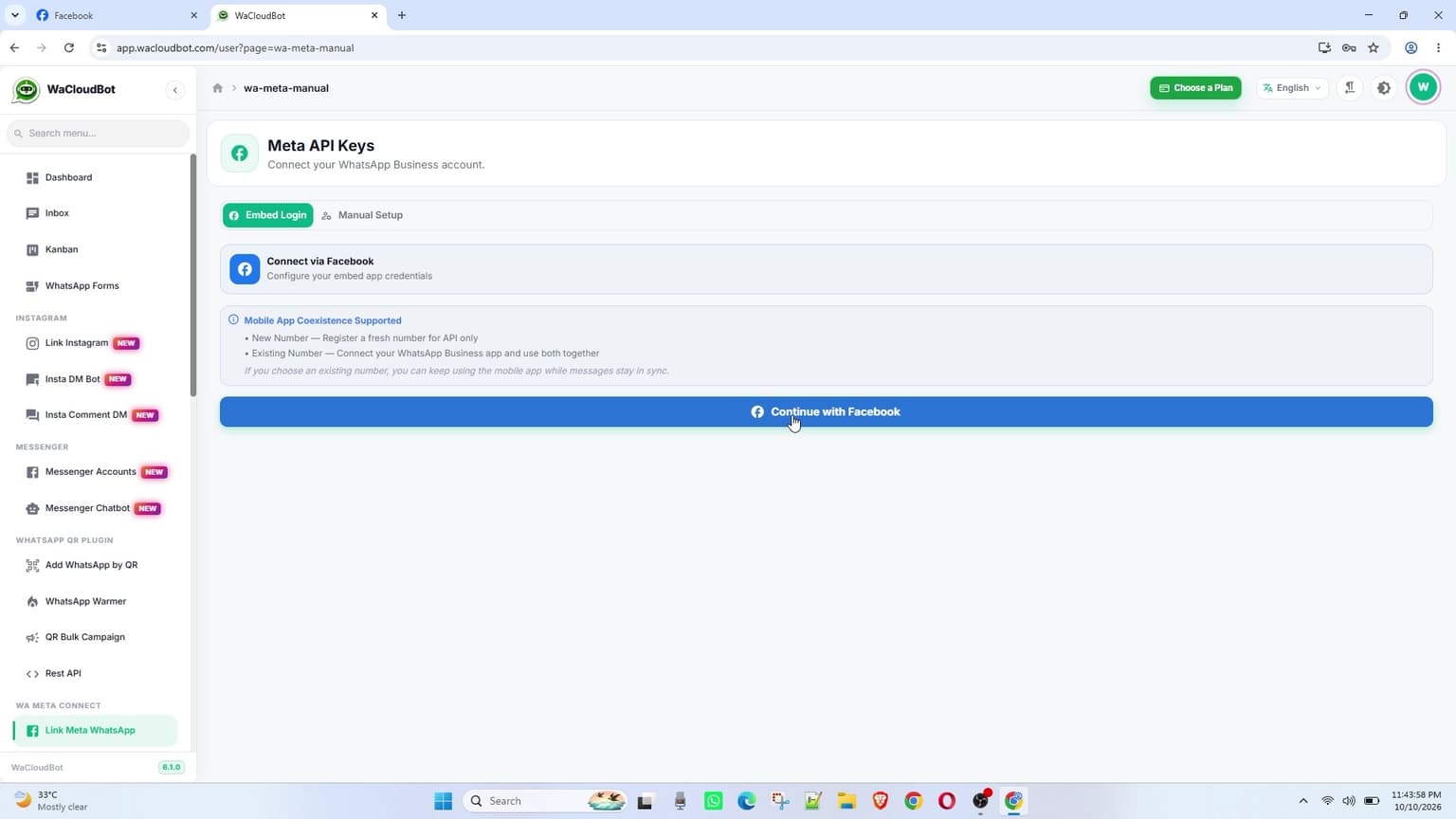
Step 2: Launch the Meta Embedded Signup Flow (Navigate to "Link Meta WhatsApp")
From your WaCloudBot sidebar navigation menu:
- Scroll down to the WA META CONNECT section.
- Click on Link meta whatsApp (or open the Meta setup configuration screen).
- Click the Embed Login / Connect via Facebook button.
This initiates the Meta Cloud API no-code setup by triggering Meta's secure embedded popup window directly within your browser.
Step 3: Log In with Facebook and Select Your Business Portfolio
Inside the secure Meta popup:
- Log into your personal Facebook account with Admin rights.
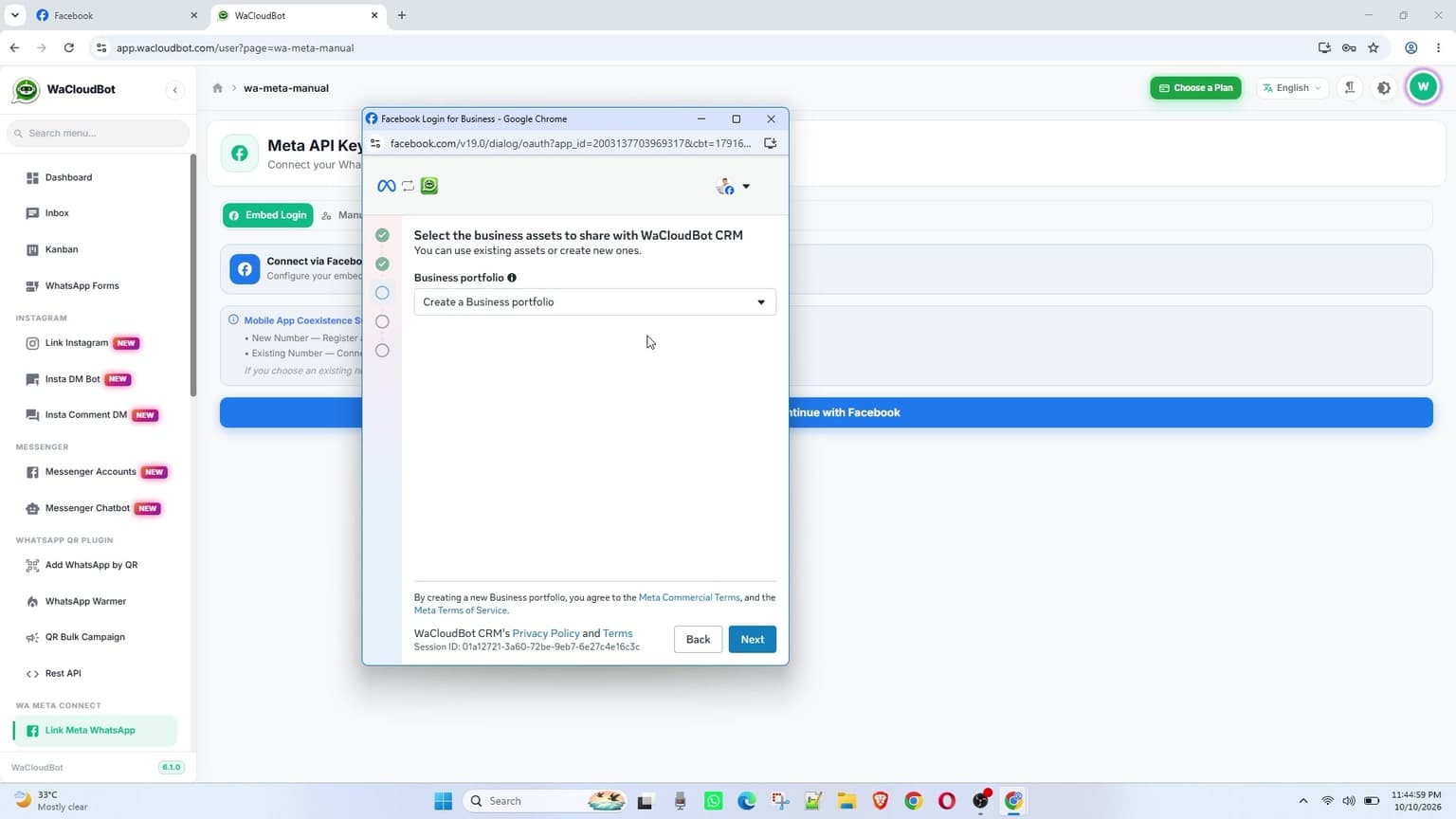
- Select your existing Meta Business Portfolio (Business Account) or create a new one on the fly.
- Review the permissions requested by WaCloudBot to manage WhatsApp Business communications, templates, and webhooks on your behalf.
Pro-Tip: Portfolio Ownership
Make sure you choose the business portfolio that owns your company's primary assets. If you do not have one yet, Meta's embedded wizard will allow you to generate a new portfolio in 30 seconds by simply entering your legal business name, country, and website.
Step 4: Add or Connect Your WhatsApp Phone Number (Coexistence & QR Scan)
This step offers two flexible onboarding methods:
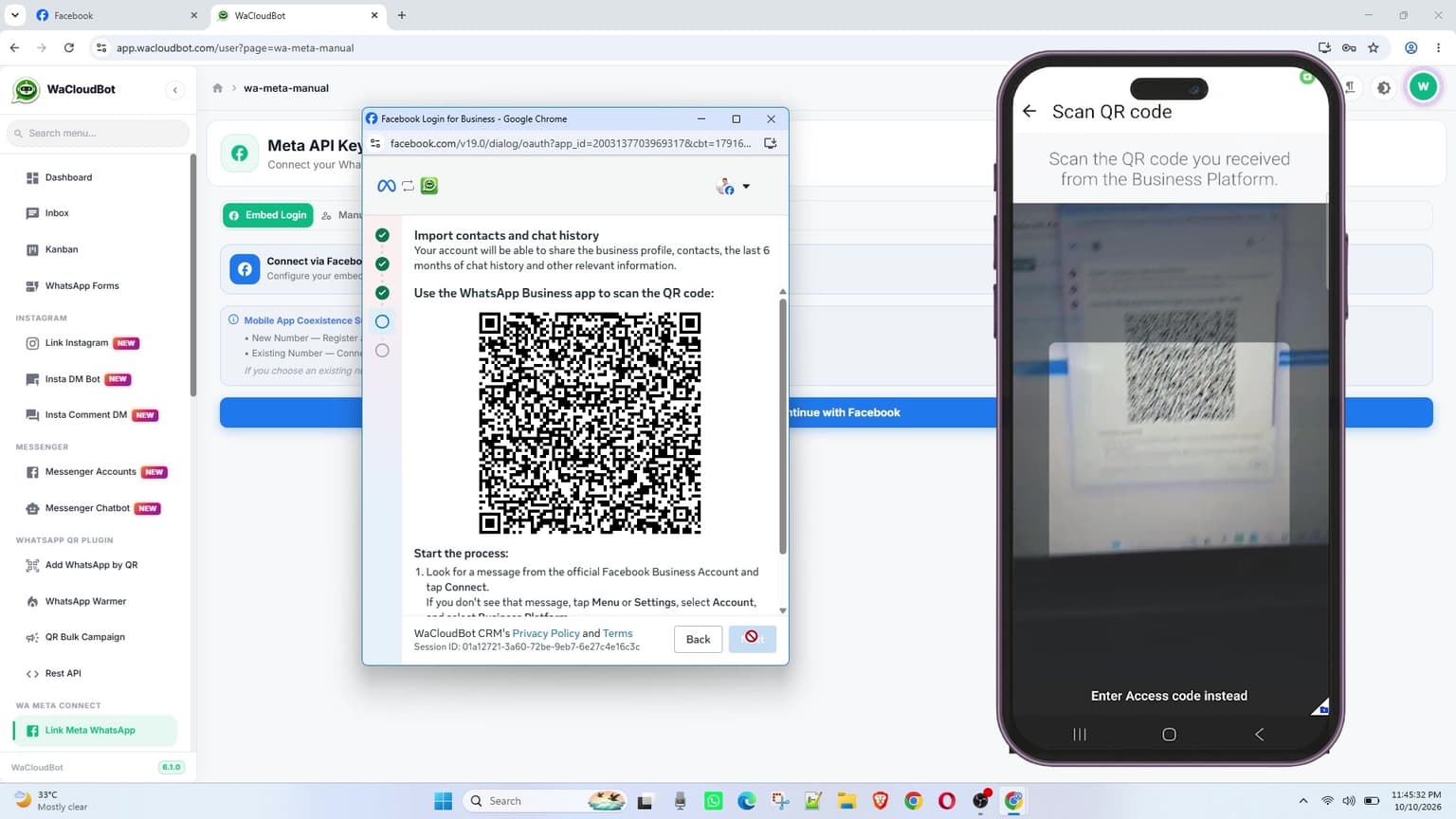
Option A: Connect Existing Number via WhatsApp Business App Coexistence
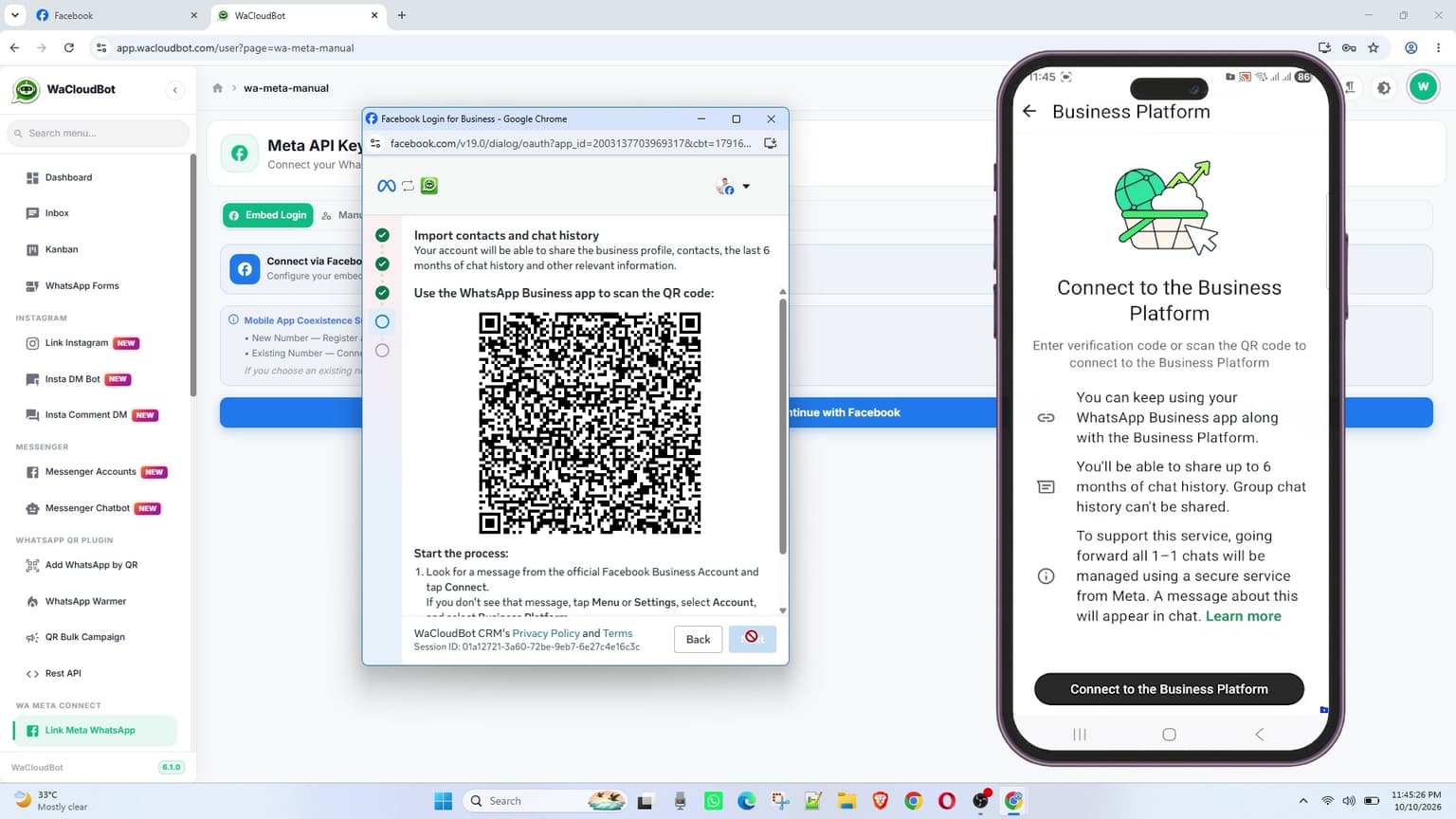
With WhatsApp Business App Coexistence, you can connect an existing number to the WhatsApp Cloud API without deleting your WhatsApp mobile application or losing previous chat history!
- When prompted, select the coexistence or QR code scan option.
- Open your WhatsApp Business app on your mobile device (
Settings→Linked Devices). - Scan the on-screen QR code to sync your profile, contacts, and mobile app directly with the Meta Cloud API.
Option B: Add a Dedicated or Fresh Phone Number
If you are onboarding a new or standalone business line:
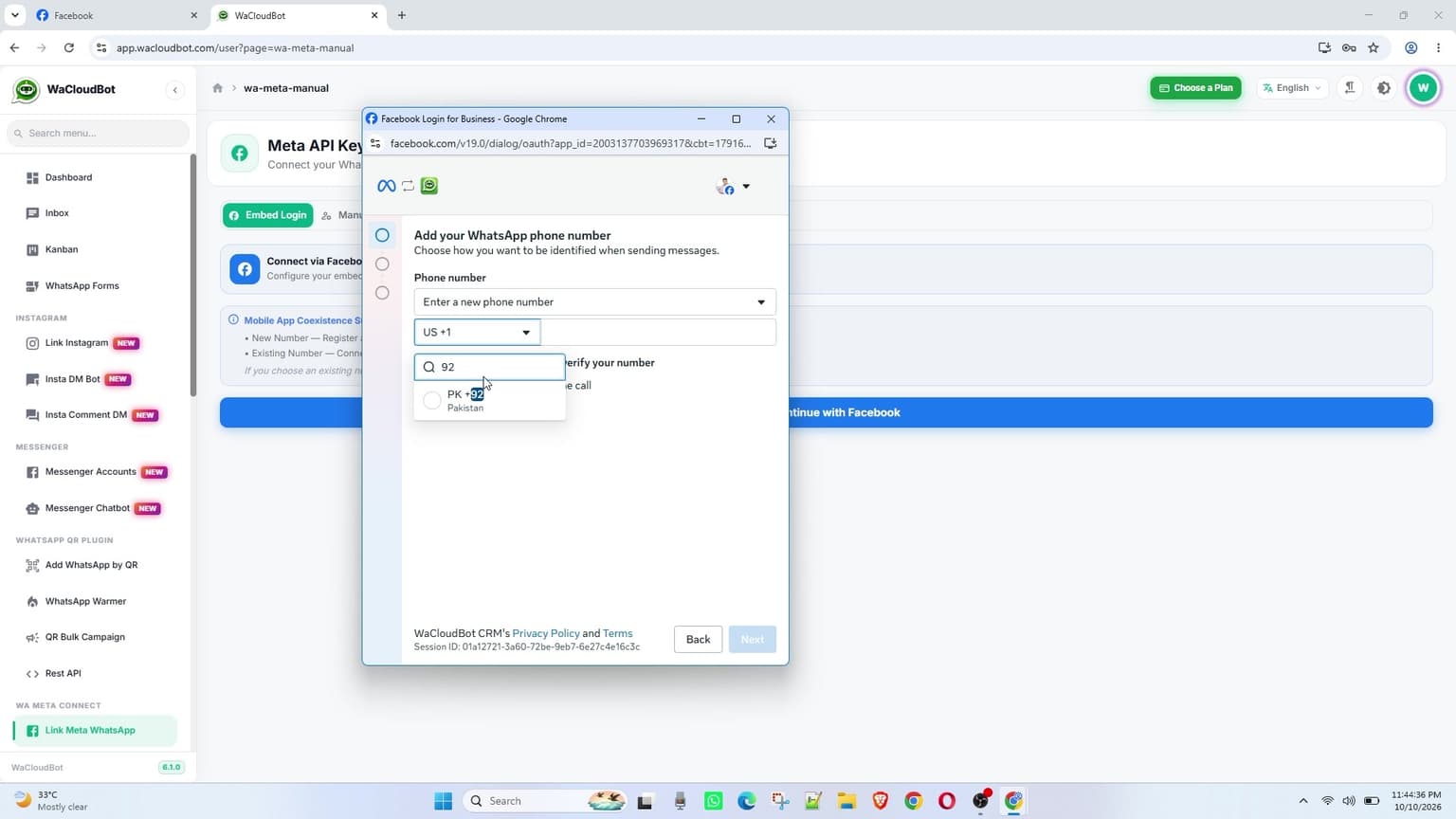
- Enter your phone number with your country code.
- Select verification via SMS or Phone Call.
- Enter the 6-digit one-time password (OTP) sent by Meta to authenticate number ownership.
Coexistence Availability
Coexistence mode is specifically built for official WhatsApp Business mobile app accounts. It allows your staff to reply on physical smartphones while simultaneously leveraging WaCloudBot's cloud automations and shared team inbox.
Step 5: Grant Permissions & Finalize Connection
Review and confirm the permissions:
- Allow WaCloudBot to send messages and manage templates.
- Click Finish.
- The popup closes automatically and returns you to your WaCloudBot console.
Your dashboard will update to display:
- "Your account is successfully linked!"
- Mobile App Coexistence Active (or Connected Cloud API status)
- Live synchronization of messages between your mobile device and the WaCloudBot dashboard.
Pro-Tip: No Upfront Payment Required
You do not need to add a payment card in Meta Business Suite right away to begin using the API. Meta provides a generous free tier of 1,000 service conversations every single month to all registered WhatsApp accounts.
0% Message Markup & Direct Meta Billing
Unlike legacy BSPs that charge a 20% to 50% commission markup on every customer interaction, WaCloudBot enforces a strict 0% message markup policy:
- 1,000 Free Service Conversations Monthly: Meta grants 1,000 free inbound/service conversations every month for customer support and automated bot interactions.
- Direct-from-Meta Billing: For outbound marketing campaigns, utility confirmations, and authentication OTPs, Meta bills your credit card directly through the official Meta WhatsApp Manager.
- Zero Hidden Surcharges: You only pay for your WaCloudBot software subscription; your message fees go straight to Meta at their exact regional wholesale rates.
What Can You Do Next With Your Official WhatsApp API?
Now that your official Cloud API is connected, unlock the full growth potential of WaCloudBot:
Multi-Agent Shared Team Inbox
Assign incoming chats to department managers, track response times, add internal agent notes, and organize conversations with Kanban boards.
Meta-Compliant Bulk Broadcasts
Launch high-volume marketing campaigns and promotional broadcasts using official Meta-approved interactive templates with 0% markup.
Visual No-Code Chatbot Builder
Build 24/7 automated qualification bots, interactive button menus, dynamic catalog showcases, and AI agent handoffs without writing a line of code.
CRM & E-Commerce Integration
Sync customer data in real time with Shopify, WooCommerce, Zapier, Make, and native REST webhooks for automated order and shipping alerts.
Frequently Asked Questions
WaCloudBot Documentation
Welcome to the WaCloudBot documentation. Learn how to connect WhatsApp Business API, build automated chatbots, launch marketing campaigns, and integrate your CRM.
Quickstart Tutorial
Step-by-step instructions to get started with WaCloudBot and send your first WhatsApp message using the Cloud API.